Skip to Content
Australian support
1300 195 055 support@truevault.com.au Mon–Fri · 9am–5pm AEST
NoTouch Visitor Management · for the front desk

Reception without the rigmarole.

Print one sign with your logo and a QR code, stick it on the front desk. Visitors scan, look at their phone, and they’re in — no pen, no clipboard, no tablet to wipe down between people. Just one face, one identity, one good morning.

Talk to TrueVault See how it works
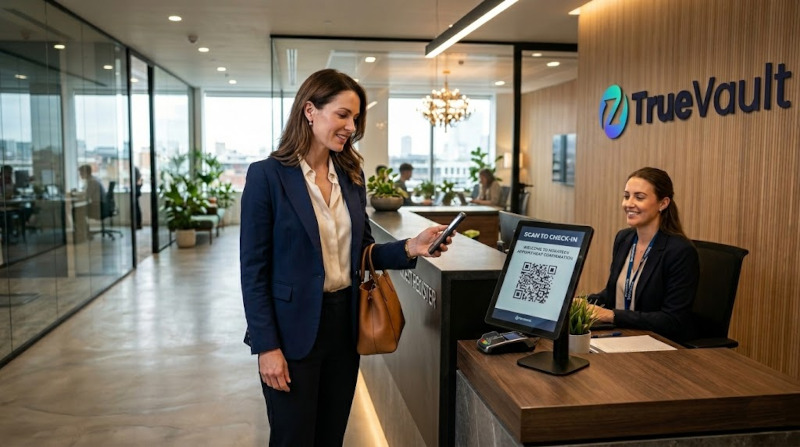
A visitor scanning a TrueVault QR code at a reception desk while a receptionist welcomes her.
One QR. One face. Welcomed in 8 seconds.
01 / The shift

The front desk has tried everything else.

Sign-in has been rebuilt three times in twenty years — and every version still asks the visitor to do the work. Type it in. Hand the licence over. Put your name on a list anyone can read. There’s a calmer way that doesn’t ask anyone to prove themselves twice.

The old way · 01

Pen & paper book

Visitor names on display to everyone behind them. Lost the moment the book is full.

  • Every name visible to the next person
  • No identity check whatsoever
  • A privacy notice nobody can enforce
The old way · 02

Manual ID capture

Reception photocopies a licence and pops it in a folder. Now you own it forever.

  • You're holding documents you didn't want
  • A breach waiting to happen
  • Real verification still didn't happen
The old way · 03

Tablet sign-in kiosk

Every visitor re-types their name, company, host and reason. Every. Single. Visit.

  • Same data re-entered every visit
  • One device, one queue, one outage
  • Still no proof of who tapped
The TrueVault way

Scan once. Welcomed forever.

The visitor’s identity already exists in TrueVault. They scan the QR, look at the phone, and the front desk knows who they are — bound to a verified human, not a name they could’ve made up.

  • No documents to capture, store or lose
  • Same identity works at every site you operate
  • Every entry is a signed, auditable event
02 / How it works

Print a sign. Hand back the desk.

We provide you with a PDF with your logo and a unique QR. Print it, stick it where visitors arrive, and the queue stops happening. No reception terminal. No app downloads. No re-enrolment.

The printable sign A4
Your logo
Scan to check in.
Point your phone camera at the code below. We’ll do the rest.
Powered by TrueVault site · 04
One per site. Re-printable anytime. Live
The check-in

Eight seconds, end to end.

1
Print the sign
Your logo. Your QR. One A4 page.
0.0s
2
Visitor scans
On their own phone, no app to install.
+2s
3
One look at camera
Live biometric check, ~3 seconds.
+5s
4
Welcomed in
Host pinged. Audit event sealed.
+8s
Optional: let first-time visitors enrol on the spot — about 90 seconds — so they skip the line on every future visit. Turn it off where the site needs invite-only access.
03 / The modes

Two ways to run it. One identity behind both.

Some sites want a person on the door. Others want the door to make up its own mind. TrueVault does either — and the moment you change sites or shifts, you don’t change anything else.

Mode A · Staffed

Front-desk terminal

The receptionist or security officer sees each check-in arrive on a dedicated terminal — name, photo, host, credentials, why they’re here. Approve, hold or decline in one tap.

Arrivals · Level 12 14:02
MH
Mara Holloway
Visiting · Sam Reid · 14:00
RTW ✓
DT
Daniel Tjandra
Contractor · Plant room · 13:55
Ticket missing
  • Human-in-the-loop for VIP, sensitive or contested arrivals
  • Reception sees photo + host + reason at a glance
  • Hand-off to security with one tap if anything's off
Mode B · Unattended

Automatic decisioning

No front desk required. TrueVault checks identity, credentials and policy on the spot — opens the door, pings the host or politely declines, with a reason the visitor can read.

decision.evaluated 147ms
Identity match 0.998
Liveness passed
Right to Work verified
Site policy after-hours · allow
Granted · host notified
  • Match + credentials + policy, evaluated in milliseconds
  • Out-of-hours, satellite sites, lobby-less buildings
  • Decisions and reasons logged for every arrival
04 / The credentials

Ask for what the site needs.

Different sites, different rules. Require an in-date Right to Work, a current contractor induction, or an active employment record before the door opens — without making your reception team chase paperwork.

Verified at the source.
Credentials are checked live against the issuing body — never a photo or a PDF.
Employee
Active employment record
Optional
Right to Work
In-date, source verified
Optional
Contractor ticket
White card, induction current
Optional
Event invitation
One-time, ticketed entry
Optional
Government ID
Where the site requires it
Optional
Vendor on register
Approved supplier list match
Optional
05 / The record

Every entry, sealed and searchable.

When an incident gets asked about three weeks later, you’re not flipping through a visitor book or guessing who the tablet timed out on. You’re looking at a signed log with the right human, the right time and the right reason.

One ledger of every arrival

Across every site, every shift, every credential — searchable and exportable.

Privacy-preserving by default

We never hold the documents. The receipt is a signed event, not a photocopy.

Right of return

A visitor can see, query and revoke their own record at any time, from their phone.

visits.log · site-04 Sealed
{
  "event":     "visitor.checkin",
  "actor":     "verified_human:0x4f…a91c",
  "biometric": { "match": 0.998, "liveness": "passed" },
  "site":      "site-04.reception",
  "host":      "sam.reid@yourco",
  "reason":    "client-meeting",
  "creds":     ["rtw:current"],
  "ts":        "2026-04-29T14:02:11Z",
  "sig":       "ed25519:0x9b3d…7e21",
  "prev":      "sha256:0x71ac…0bd2"
}

Print one sign. Let the front desk breathe.

We'll send you a PDF tonight. Stick it up tomorrow. Stop running a clipboard the day after that.